Chrome
Free with every plan. Takes about a minute — you sign in with your email, not a key. You can create the account first and buy a plan later.
Add to ChromeInstall
The add-on goes on your computer, not this phone. Open this page on the computer you want protected, or call us on 941-477-8324 and we’ll do it with you. You can sign in here to see your plan.
Sign in to see your planThe FNS Shield add-on is live in the Chrome Web Store and included with every plan — add it below, or bring the computer in and we’ll put it on for you along with everything else.
Your browser is the program you use to go on the internet, such as Google Chrome or Microsoft Edge. The add-on is the small part of Shield that sits inside it and checks each page.
Already on a plan? The add-on is included — the button below takes about a minute, or bring the computer in and we will put it on for you.
Add FNS Shield to ChromeUse this button rather than searching the store: Shield is not listed in the search, and this button goes straight to the right page.
The same add-on works in both.
Free with every plan. Takes about a minute — you sign in with your email, not a key. You can create the account first and buy a plan later.
Add to ChromeThe same button works. Edge asks you to turn on “Allow extensions from other stores” the first time (extensions is Edge’s word for add-ons) — say yes, then add it as normal. There is nothing to type and no settings page to find. There’s no separate Microsoft Edge Add-ons store listing yet, so this Chrome Web Store link is the real, working way in for Edge too.
Add to EdgeUsually you won’t have to — a technician activates it on the bench before your machine goes home. If you’re setting up a second computer, or you reinstalled your browser, it takes about a minute:
There is no key to type or paste — just your email address. If you check the toolbar icon before you finish, it will say “Not set up yet” and mention a “licence key” — tapping Activate there just takes you back to the sign-in link above, not a key to hunt down. If the link doesn’t arrive within a few minutes, check your spam folder, then call us at 941-477-8324 and we’ll do it with you on the phone.
You can also see your plan and license status any time in the customer portal — sign in with the email and password you made when you joined.
A separate Windows program that catches remote-access tools like AnyDesk and TeamViewer being opened, before anyone can connect. It shipped as a signed installer on 2026-08-25 and is included with Shield Complete and Shield Complete Family — every plan except the entry-level Shield Browser.
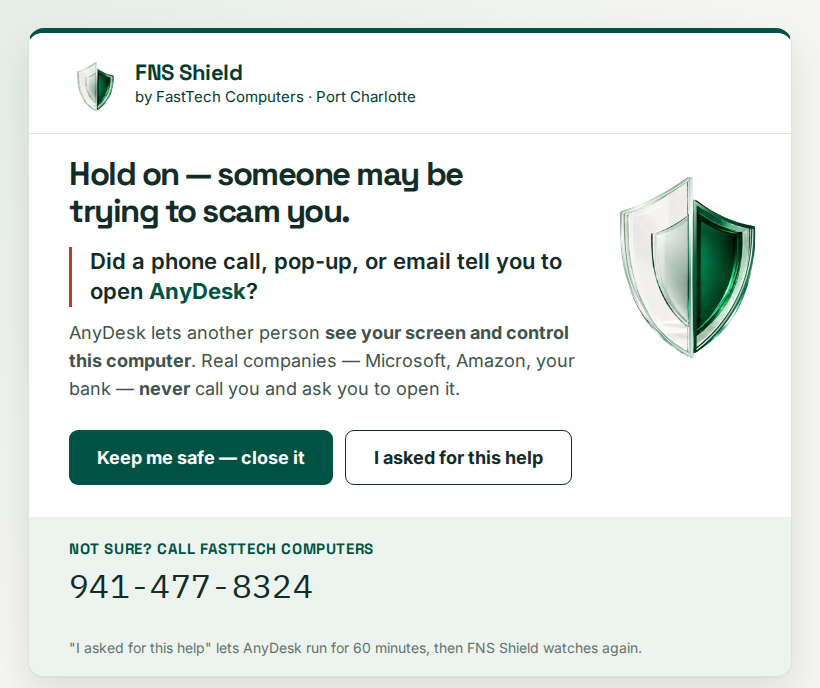
Included with your plan
If your computer came to the bench, a technician already installed it — there is nothing for you to download. It keeps itself up to date from then on. Bought online instead? Use the card beside this one.
Digitally signed by FNS Computer Technology, LLC — that is the name Windows will show you when you run it, and it is us. Needs a Shield Complete or Shield Complete Family plan to switch on. Windows only. Stuck? Call 941-477-8324 and we’ll do it with you.
Download for WindowsAlready on a plan? Get started →