Technical overview
How FNS Shield works.
Written plainly enough for anyone, but with enough technical detail that a security-minded reader can trust it.
- Local shop Port Charlotte, FL
- Talk to a person 941-477-8324
- Keep your antivirus Shield runs alongside it
This page covers the browser extension (the Shield add-on that sits inside Chrome or Edge) specifically — one part of the FNS Shield service, and the part with the most moving pieces. The rest of the service (the bench setup, the filtered connection, the remote-access cleanup, the number on your monitor) is described on the overview. The extension is live in the Chrome Web Store today, and the separate Windows desktop program shipped too — see below for that, and see status for where Edge stands.
The four things it watches for
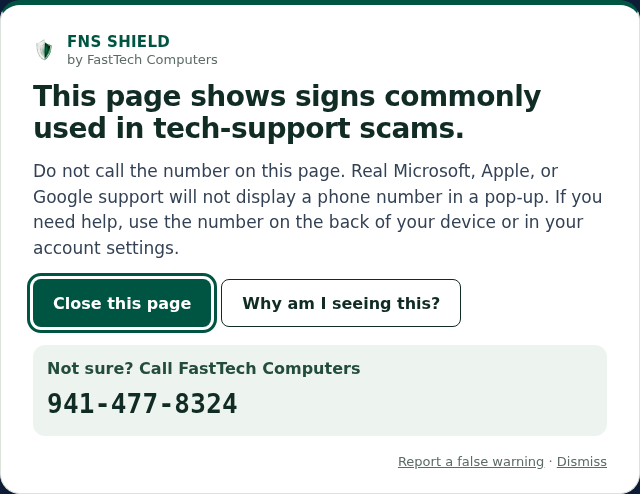
Every page you visit is checked against four independent detection rules. If any one fires, a full-width warning card appears at the top of the page — you have to see it before you can interact with what’s below.
1. Fake tech-support numbers
Pages that combine a prominent 1-800 number with scare language and unauthorized Microsoft, Apple, or Google branding. Requires the impersonated brand to appear in a heading, title, or logo — not just in prose — to keep precision high.
2. Browser lockers
Pages that force your browser into full-screen, hide the close controls, or spawn dialog loops (“are you sure”, “stay on page”). Real websites do not do this.
3. Remote-access tool downloads
If a page offers AnyDesk, TeamViewer, UltraViewer, Supremo, RustDesk, Ammyy, or Quick Assist from anywhere except the real vendor’s domain, we warn. Scammers typically host these on look-alike domains.
4. ClickFix / paste-into-PowerShell
The newest scam wave. Pages tell you to press Windows+R, open PowerShell, and paste a command. We detect the instruction language and PowerShell syntax markers before flagging.
On top of the four rules, we ship a signed bad-domain blocklist that updates every six hours from our CDN. If the current page’s hostname is on the list, the warning fires before we even run the heuristics.
The warning overlay is built to resist the page
The warning card is rendered into a closed shadow DOM attached to the root of the page. That’s a technical way of saying the page’s own JavaScript cannot read or restyle the inside of the card. If the page deletes the card’s container outright, we detect that and put it back. Keyboard dismissal only responds to a real keypress from you — a keystroke faked by the page is ignored. This matters because real scam pages actively try to suppress warnings.
We won’t tell you it cannot be bypassed. Anything running on the page can keep trying, and a determined scam page can still contest what sits on top. What we can say is that each of those attempts has to beat a specific defence, and that we treat any way around them as a bug worth fixing fast.
The license lives on your device
Your plan carries an Ed25519-signed license. A FastTech technician normally activates your license on the bench before your machine goes home, so there is nothing for you to do. If you ever need to turn it on yourself — a second computer, a browser reinstall — you will open the extension, type the email address we have on file, and click the sign-in link we send you. Protection turns on by itself once you click that link. There is no key to type or paste — just that email address; if you check the popup before you finish, it will say “Not set up yet” and mention a “licence key” — tapping Activate there just takes you back to that same sign-in link, not a key to hunt down.
Once activated, the extension verifies that license offline against a public key baked into the extension. Day to day, whether you are protected is checked on your computer, not by our server; from version 1.0.7, our server can also tell the extension to switch off after a refund, after your plan is moved to another computer, or (for a second or third browser) after the shop releases your plan from this computer (see below). Newer versions of the extension, while protection is on, also send its license, a random installation ID, and its version number to our server about once a day, so our records show which version you run and when it was last seen. Copies installed before that update don’t do this yet.
From version 1.0.7, activation and that daily check-in also send a scrambled computer code, worked out on your computer from a few general traits of the machine, so that one plan’s browsers stay on one computer. Every browser on the same computer normally works out the same code; if a browser on your own computer is ever refused, call the shop at 941-477-8324 and we will sort it out.
From 1.0.7 the check-in’s answer can also switch protection off in that browser in three cases: when your plan has been moved to another computer with “Move it to this computer” (that normally switches off every browser on the old computer at its next daily check-in; if one does not, call the shop at 941-477-8324); when the shop releases your plan from this computer (that switches off only the plan’s second and third browsers here, not the first one); or when your license has been revoked (for example, after a refund). If a browser was switched off on a computer your plan still belongs to, open your sign-in link in that browser (or sign in on the account page in that browser) to turn it on again; use “Move it to this computer” only when the plan should leave a different computer. After a revocation, protection stays off.
Also from 1.0.7, an activation our server never confirmed (for example, one made while you were offline) is removed once the server refuses that activation (for example, because your plan is already in use on another computer or in 3 browsers on this one, or because the license is not valid). Earlier versions never use the check-in’s answer to switch protection off.
From version 1.0.8, after a move is undone, the plan’s first browser on the computer the plan went back to, if it still holds the plan’s old license, is handed the plan’s current license at its next daily check-in, and keeps it only after checking that we signed it and that it is for this installation and the same plan. The plan’s second and third browsers there switch off at their next daily check-in even if they look on now; open your sign-in link in each of them. The Privacy Notice lists exactly which traits go into the computer code.
If we ever need to revoke a specific license (for example, after a refund, or when a computer leaves the plan), your extension also learns of it from a signed revocation list on our CDN once we publish the updated list; the extension checks that list about every 6 hours. Cancelling your plan is different: it does not switch protection off early. A cancelled plan keeps protecting until the end of the period you have already paid for, and then its license simply expires.
What we do not collect
Not collected
- The URLs you visit
- the content of pages
- your search history
- usernames or passwords
- what websites you go to
- anything about your bank, email, or accounts.
What is stored
- The email address on your account
- your Square customer and payment IDs
- which plan and how many seats you have
- when a license was issued, renewed, or revoked.
See the Privacy Notice for the full list.
It runs alongside your antivirus
FNS Shield is a browser extension. It complements Windows Security, Malwarebytes, Norton, McAfee, or whatever else you already use. It does not compete for the same job — antivirus scans files, we watch web pages. Both matter.
Works in Chrome and Microsoft Edge. Firefox and Safari later.
The extension is built for Manifest V3 and targets Chrome 120+. It is live in the Chrome Web Store and included with every plan — add it to Chrome, or bring the computer in and we will set it up. It also runs in Microsoft Edge from that same link, once you turn on Allow extensions from other stores in Edge's extension settings first — there is no separate Microsoft Edge Add-ons store listing yet, so the Chrome Web Store link is the real way in for Edge too. That listing is unlisted, so it will not turn up if you search the store — the link above is the way in. See the status page for where things stand for Firefox and Safari.
There is no macOS app. A separate Windows program watches for remote-access tools like AnyDesk and TeamViewer — it is not a browser extension and is not covered by this page. It shipped on 2026-08-25 as a signed installer and is included with Shield Complete — installed at your bench visit, and it checks for updates itself afterward. Its own daily check-in never switched it off before version 1.2.6; from 1.2.6, that check-in’s answer switches the Windows program off after a refund, or when its plan has been moved off that computer to another one. See the overview for where that stands.
Included with every plan · cancel any time by calling or stopping in.